 HippoRemote Basic
Wireless Keyboard & Multi-Touch Trackpad for Macs & PCs
HippoRemote Basic
Wireless Keyboard & Multi-Touch Trackpad for Macs & PCs

HippoRemote Basic turns your iPhone/iPod touch into a palm-sized replacement for your wireless keyboard and mouse. No more bulky devices cluttering up your coffee table.
It's great for web surfing from your couch, navigating slideshows or delivering a presentation. And with the full-screen arrow pad, Basic is also a great way to control many media programs.
And because HippoRemote works over Wi-Fi, the range far exceeds IR/Bluetooth/RF devices, letting you control your Mac/PC from anywhere in your home or office.
Key Features-
Multi-Touch Trackpad
An ultra-smooth, ultra-responsive trackpad, with support for Multi-touch Gestures including Pinching. Widescreen orientation support lets you use HippoRemote as a mouse or trackpad replacement, bringing multi-touch control to any computer. -
Intelligent Keyboard
Remembers what you've typed so you don't ever have to repeat yourself. Access to arrow keys, navigation keys, modifier keys and function keys. Tallscreen and widescreen orientations. -
International Keyboards
Full Unicode support for entering text in Chinese, Japanese, Greek, Russian, or any other iPhone supported language. -
Split-Screen Mode
Split screen keyboard and trackpad for simultaneous access. -
Shake-to-Toggle
Give your iPhone/iPod a quick shake to toggle from trackpad to keyboard and vice versa. -
Arrow Pad
Large arrow buttons for controlling media apps (like Boxee, Hulu Desktop, Plex) or running presentations (Keynote, PowerPoint). -
Macro Bar
Create and store your favorite shortcuts for one-touch access. -
Login & Password Manager
One tap to auto-fill login information for your favorite web sites. -
Wake-on-LAN
Turn on your computer from your couch. -
Quick Setup
Macs and Linux PCs can work with HippoRemote without any extra software. For Windows users, or for enabling certain advanced features, we have a free HippoVNC helper program. -
No Pointing, Line-of-Sight Issues
HippoRemote works over your Wi-Fi network, so you never need to worry about aiming your remote. Control everything from your most comfortable position.
-
Integrated Web Browser
Surf, email, update Facebook, check sports scores, chat with friends, and more, all without leaving HippoRemote. And for viewing sites on the big screen, you can easily send links from the built-in browser to your desktop.
More Info -
Native Twitter Client
Post status updates. Browse your Twitter timeline & lists. Explore links on your iPhone/iPod or open them on your Mac/PC with one tap.
More Info -
Boxee Gesture Pad
Control Boxee with flicks, swipes and taps on our custom, ultra-smooth, gesture-based touchpad.
More Info, Video


— Plugins —


Multi-Touch Trackpad Gestures

Trackpad Buttons on Bottom

Split Screen Trackpad + Keyboard
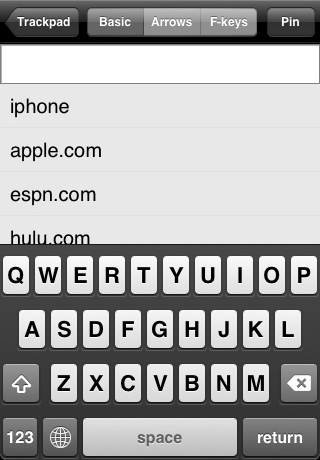
Keyboard History Eliminates Extra Typing

Arrow and Modifier Keys

Function Keys

Simple Arrow Pad Remote

Login & Password Manager

Pick Your Own Wallpaper.
Image by infopower

Auto-Connect

Create Your Own Macros

Unicode Support (Requires HippoVNC)

Integrated Web Browser

Boxee Gesture Pad

Native Twitter Client